
Oscyl

Your synth's sounds, in order.

Oscyl is an open-source librarian and sound editor for hardware synths. It reads every program, draws each stage of the sound, and writes back only what you changed. It is not a DAW, a sequencer or a preset converter.

Pre-alpha. Checked with a real minilogue xd: the desktop app and the command line on Linux, the Android app, and oscyl info on Windows. The prologue and the Prophet Rev2 are tested against simulators only. Builds are on the Releases page.
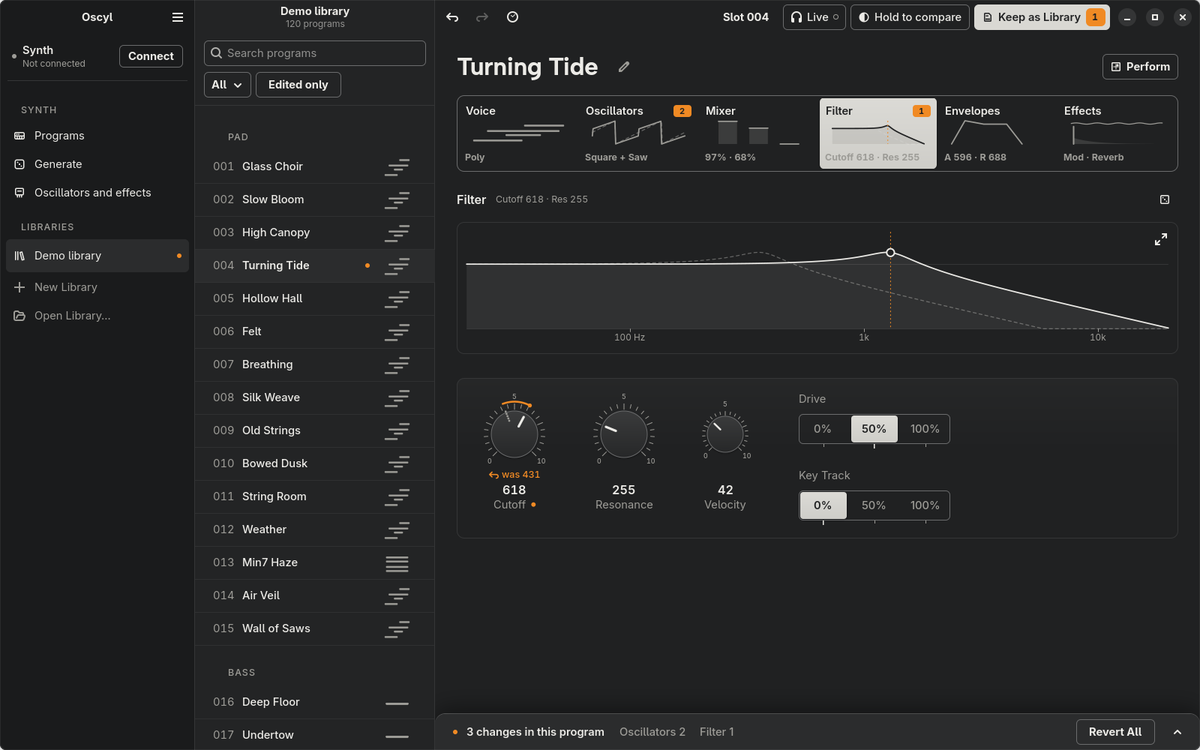
The Oscyl editor on Linux: the program list, the six stage tabs, the filter graph and its dials
Library
The Android library: a list of programs, each with a picture of its sound The Android editor: a stage with its dial and the stage rail under the thumb

Every program, with its picture.

Read the synth once and keep working with it unplugged. Rename, reorder, search and move programs between libraries, on the desktop or with one thumb on a phone.

  • Works offlineYes
  • Vendor library filesRead and written unchanged
  • Own format.oscyllib
Edit
The Linux editor at the Filter stage: the cutoff at 618, was 431, with the saved curve dashed behind the edited one

Follow the signal, stage by stage.

Voice, oscillators, mixer, filter, envelopes, effects: each stage has a live graph and every parameter. Each change plays on the synth as you make it, but the synth stores nothing until you sync. With Live on, a knob turned on a minilogue xd moves here too.

  • Cutoff618 was 431
  • AuditionLive, nothing stored
  • The synth's own knobsFollowed as you turn them
Compare
The Linux editor showing the saved version of the program while Compare is held

The saved sound never leaves.

Every dial keeps its saved value on its face, and every stage counts its edits. Hold Compare and the synth plays the saved program; let go and your edit is back.

  • HistoryEvery step, undoable
  • Snapshots3 to store and recall
Generate
Generate on Linux: families of characters, four shape dials, Surprise Me, and six generated sounds

Six new sounds from four dials.

Pick a character, or let Surprise Me pick one, and shape it with Bright, Movement, Grit and Ambience. Vary a sound, breed or morph two, share one as a recipe code, and keep the ones worth a slot.

  • Characters28 on the minilogue xd
  • Recipe codesThe same sound, anywhere
Oscillators
New Oscillators on Linux: six generated oscillators, each with its wave and its parameters

Oscillators nobody else has.

A minilogue xd or prologue runs small programs called units, made with KORG's logue SDK. Oscyl has one unit of its own that makes new oscillators, from wavetables, FM, folding and formants, and loads the one you keep into a free slot. You need it only for new oscillators. Your own logue SDK units sit on a shelf, and Generate uses every unit your synth holds.

  • FamiliesWavetable, FM, Fold, Formant, Noise, Hybrid
  • Your unitsOne click from a free slot
Sync
The list of changes under the editor: each edited value with its old value and a revert

Nothing is written by surprise.

Before a sync, Oscyl lists every change and backs up the slots it will touch. Then it writes only those slots and waits for the synth to confirm each one.

  • Slots writtenEdited ones only
  • BackupBefore every sync
  • Factory slotsNever changed
Download
LinuxFlatpak (GNOME app) and the oscyl command line
AndroidAPK for phones, foldables and tablets
WindowsAn installer or a zipped folder, and the oscyl command line. The installer needs no admin rights. To remove Oscyl, use Settings > Apps
macOSOscyl.app and the oscyl command line
iOSBuild from source for now
Synths
KORG minilogue xdChecked on the synth (firmware 2.10)
KORG prologueTested against a simulator only; hardware testers wanted
Sequential Prophet Rev2Tested against a simulator only; hardware testers wanted
YoursWrite a driver or ask for one
Try it

No synth on the desk? Use the demo one.

The simulated synth answers like a real one, with no sound. You need Rust 1.92 or newer. The whole tour ยท Other builds

git clone https://github.com/oscyl/oscyl && cd oscyl
# Linux, macOS, Windows
cargo run -p oscyl-cli -- --simulator info
# the Linux app
cargo run -p oscyl-gtk -- --simulator